Buffer Review 2025: The Simple, Effective Social Media Scheduler
Is Buffer still worth it in 2025? A hands-on review of cross-platform scheduling, the AI Assistant, analytics, and the $5/channel/month pricing.

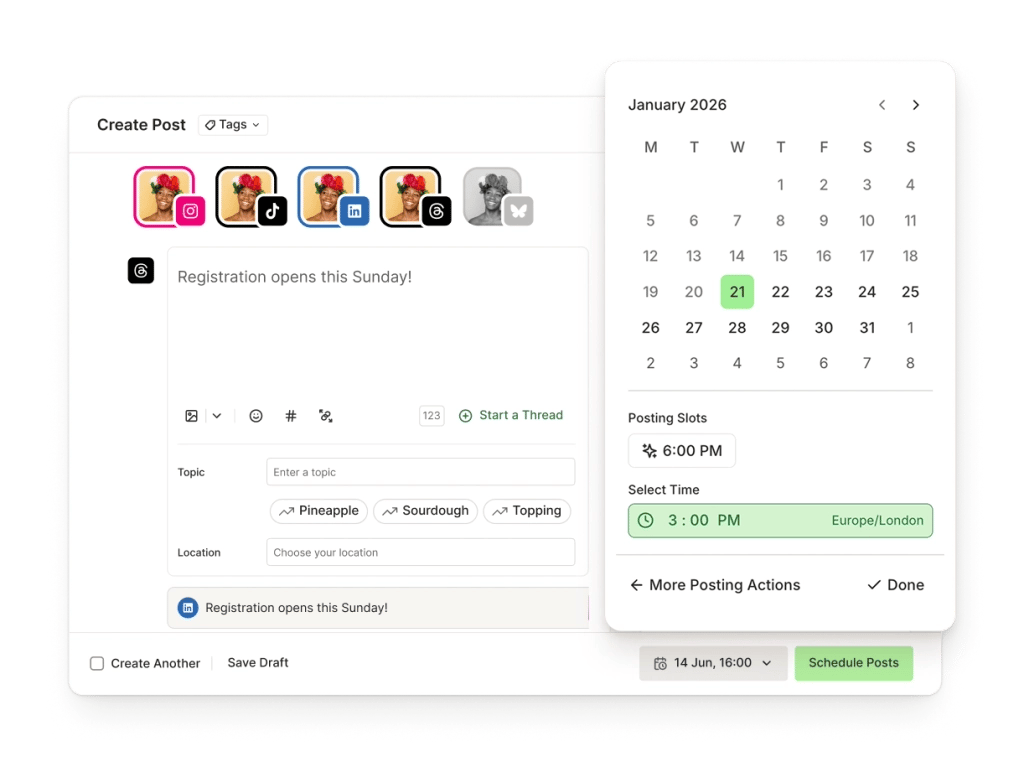
The good
- Clean, intuitive UI from the first use
- Supports many platforms: Instagram, TikTok, LinkedIn, X, Facebook, YouTube Shorts, Threads, Bluesky, Pinterest, Mastodon, Google Business
- Forever free plan: 3 channels, 10 posts per channel
- AI Assistant helps write and edit content quickly
- Built-in Start Page and basic analytics
The not-so-good
- Per-channel pricing can get expensive when managing many accounts
- No unified inbox/DM experience like some competitors
- Approval workflows only on Team plan ($10/channel)
- AI and API limits on the free/low tiers
If you're tired of juggling six browser tabs every time you want to post to Instagram, LinkedIn, X, Threads, TikTok, and Pinterest, Buffer is still one of the cleanest answers in 2025. After a decade in the market it has dropped the "all-in-one marketing suite" arms race and doubled down on what it was always best at: planning, scheduling, and analyzing social posts without making your brain hurt.
👉 Try Buffer free: buffer.com/?via=promo68 (affiliate link — same price for you, small commission for me)
TL;DR
- Best for: solo creators, freelancers, small teams, and agencies managing 1–25 social channels.
- Why pick it: the most intuitive scheduling UI on the market, transparent pay-per-channel pricing starting at $5/month, and a generous free plan that covers 3 channels with 10 scheduled posts each.
- Skip it if: you need deep social listening, competitor benchmarking, or a full CRM — Hootsuite, Sprout Social, or Agorapulse are better fits there.
- My rating: 4.2 / 5 ⭐
What is Buffer in 2025?
Buffer is a social media management platform that lets you write a post once and publish (or schedule) it across Instagram, Facebook, TikTok, YouTube Shorts, LinkedIn, X/Twitter, Threads, Pinterest, Mastodon, Bluesky, and Google Business Profile from a single composer.
Three things define the 2025 version of the product:
- A reworked composer with per-network previews so you stop guessing how a post will render on Threads vs LinkedIn.
- AI Assistant baked into every plan — rewrite, repurpose, translate, or generate new ideas without leaving the editor.
- Start Page — a free, lightweight link-in-bio that actually looks decent and ships in two minutes.

Features I actually use every week
1. The composer + queue
The queue is Buffer's superpower. You set posting time slots once per channel (e.g. "Mon/Wed/Fri at 9am") and then just drop posts into the queue — Buffer fills the next available slot automatically. No drag-and-drop calendar gymnastics, no timezone math.
2. AI Assistant
You can paste a blog excerpt and ask Buffer to turn it into an X thread, a LinkedIn carousel caption, and an Instagram hook in one click. The output isn't going to win awards, but as a first draft accelerator it shaves real hours off the week.
3. Cross-network previews
The composer renders a faithful preview for every selected network. The character counter, link preview, and media crop all update live — you catch problems before hitting Publish.
4. Analytics & reports
The Analyze tab gives you post-level performance, the best time to publish per network, and exportable PDF reports. It's not Sprout Social, but for 80% of small-business reporting needs it's plenty.
5. Start Page (link-in-bio)
A free, hosted landing page with custom colors, fonts, and unlimited links. Great as a Linktree replacement, especially because it's bundled with the rest of your Buffer workspace.

Pricing in 2025
| Plan | Price | What you get |
|---|---|---|
| Free | $0 | 3 channels · 10 scheduled posts per channel · AI Assistant · Start Page |
| Essentials | $5 / channel / month | Unlimited scheduling · full analytics · engagement inbox |
| Team | $10 / channel / month | Everything in Essentials + unlimited users, approval workflows, draft collaboration |
| Agency | $100 / month for 10 channels | Volume discount, custom access, client reporting |
Annual billing knocks roughly 15% off. The pay-per-channel model is the part I love most: if you only manage 2 channels you pay $10/month total — not $99 like most competitors charge regardless of size.
Pros
✅ Cleanest UI in the category — onboarding takes 5 minutes, not 5 hours. ✅ Truly useful free plan — most freelancers can run their own brand on it indefinitely. ✅ Transparent pricing that scales with you, not against you. ✅ AI Assistant is included on every plan (including free). ✅ Reliable publishing — I've had maybe two failed posts in a year of daily use.
Cons
❌ No built-in social listening or competitor tracking — bring your own tool. ❌ Analytics depth is shallower than Sprout Social or Hootsuite Enterprise. ❌ Engagement inbox is Essentials-and-up only — not on the free plan. ❌ TikTok and YouTube Shorts publishing has occasional API hiccups (not Buffer's fault, but still annoying).
Who should buy Buffer?
- Solo creators & freelancers who want one tab open instead of seven.
- Small businesses (1–10 employees) with 3–10 active social channels.
- Agencies managing under ~30 client channels who value workflow simplicity over enterprise reporting.
If you're a 200-person brand running paid social, listening, and customer support out of one platform — look elsewhere. Buffer doesn't pretend to be that tool, and that focus is exactly why it stays good.
Verdict
4.2 / 5. Buffer is the rare SaaS product that got better by removing features instead of adding them. In 2025 it's the most pleasant scheduling tool I've used, the pricing is honest, and the free plan is genuinely usable. If you've been on the fence, start with free, upgrade to Essentials when you outgrow the 10-post limit, and don't overthink it.
👉 Start a free Buffer account here — no credit card required.
Disclosure: the link above is an affiliate link. If you upgrade to a paid plan I may earn a small commission at no extra cost to you. I only recommend tools I actually use.
Ready to give it a spin?
Try BufferComments
Loading comments…