Zapier + ChatGPT: Turn Any App Event into an AI Workflow
Pair Zapier's 7,000+ app connectors with ChatGPT to summarize emails, draft replies, classify leads, and route content — without writing a single line of code.
The good
- No-code, ships in minutes
- Works with 7,000+ apps
- Cheap per-run with gpt-4o-mini
The not-so-good
- Task limits add up at scale
- Prompt versioning is manual
Why this pairing matters
Zapier and ChatGPT solve very different problems, but together they form one of the most productive automation hub setups you can build in 2026. Zapier handles the structured side — the data, the events, the predictable triggers — while ChatGPT brings flexible reasoning, language, and judgment on top. Teams that adopt this combo usually replace 3-4 narrower point tools within the first quarter.
Most people start by automating a single annoying task: routing inbound leads, summarizing weekly reports, cleaning up CRM notes, or drafting first-pass replies. Within a few weeks that single workflow turns into a dozen, and the combined cost still comes in well below hiring a part-time operations contractor. The compounding effect is the real story here — every new workflow you add benefits from the data and prompts you already refined for the previous one.
Setting it up end to end
The integration itself takes about ten minutes if you already have accounts on both sides. You authenticate Zapier, authenticate ChatGPT, then wire a trigger to an action. Where things get interesting is the prompt layer in between — that is where you turn a generic automation into something that actually sounds like your business.
A reliable pattern we recommend:
- Trigger — a new row, message, form submission, or scheduled run in Zapier.
- Context block — pull related records so the model has the full picture, not just one field.
- Prompt template — a stable instruction with variable slots; keep it versioned in a shared doc so every teammate can iterate on it.
- Action — write the result back to Zapier, post it to Slack, or fan out to another tool down the chain.
- Review step — for anything customer-facing, route the first 20 runs through a human before going fully autonomous.
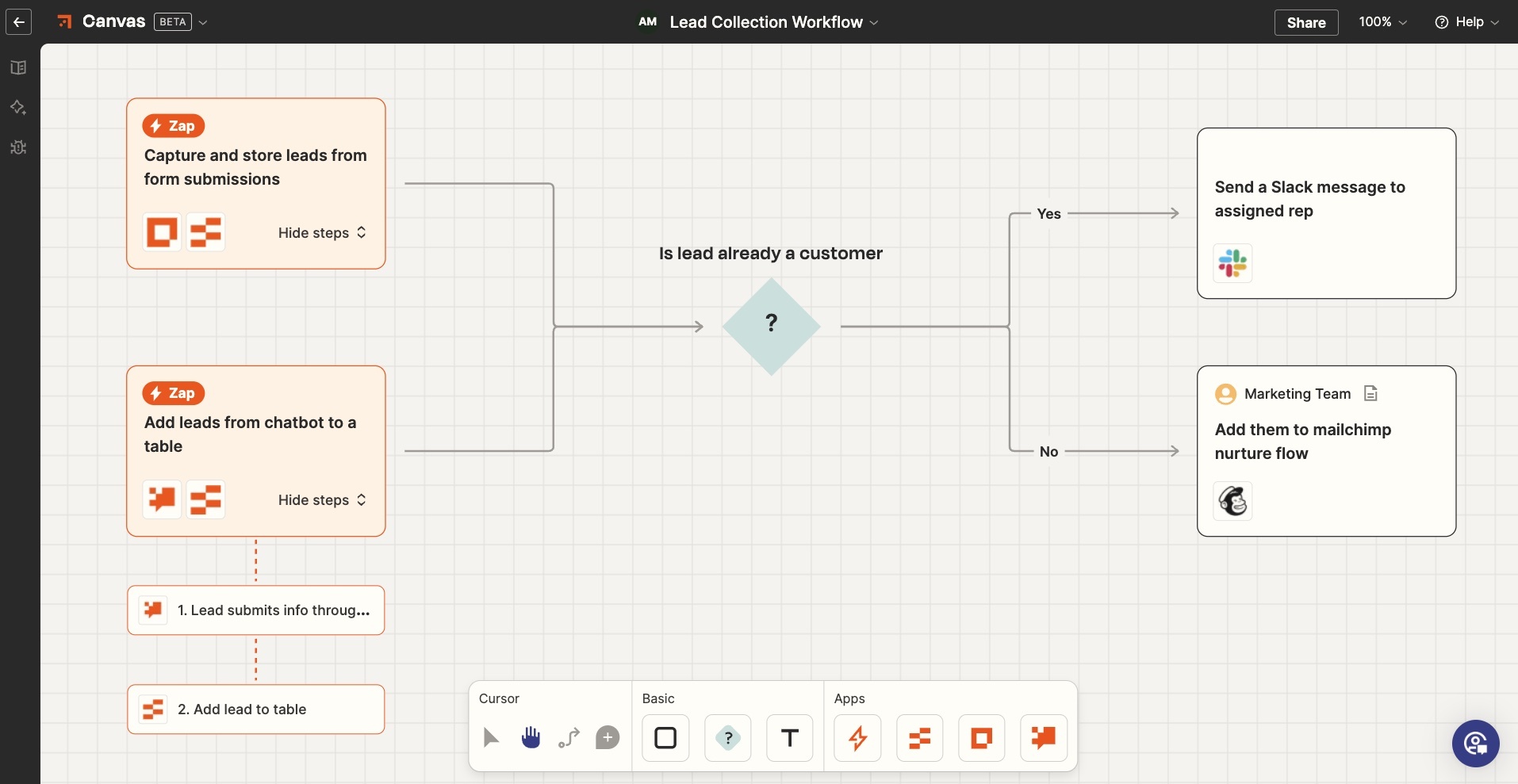
Once that loop is humming, you can start chaining workflows: the output of one becomes the input of the next, and suddenly an entire department-level process runs on its own.
Real workflows that pay for themselves
- Inbound triage: every new lead is enriched, scored, and assigned with a one-paragraph briefing for the rep before they open the record.
- Content repurposing: a single long-form post becomes a LinkedIn carousel, a newsletter intro, five tweet drafts, and a YouTube description.
- Customer support: incoming tickets get categorized, tagged with sentiment, and drafted a response that the agent only has to approve.
- Internal reporting: weekly metrics get pulled, summarized in plain English, and posted to the leadership channel every Monday at 9am.
- Research digests: a list of competitor URLs gets scraped, summarized, and turned into a battlecard update your sales team actually reads.
- Meeting follow-ups: transcripts come in, action items go out — assigned to owners with due dates and a short context blurb.
Pricing in practice
On the Zapier side, most small teams stay on the entry paid plan for the first six months. On the ChatGPT side, usage-based pricing means a well-designed workflow rarely costs more than a few cents per run. The honest math: if a workflow saves one hour of human work per week, it has already paid for itself many times over within the first month. We have seen solo founders run their entire back office on under $80/month of combined spend.
Where it breaks
This stack is not magic. The two failure modes we see most often:
- Prompt drift — the prompt was great in week one and quietly degraded as your data changed. Schedule a review every quarter and keep a small set of golden test cases.
- Silent failures — an API change or a rate limit kicks in and the automation stops without anyone noticing. Always wire an error channel to Slack or email, and add a daily heartbeat so you know the pipeline is alive.
- Over-automation — not every decision deserves a model in the loop. If a simple
if/thenrule works, use it; save the AI calls for the judgement-heavy steps.
Treat the integration like any other production system: version it, monitor it, document it, and own it.
Verdict
If you only adopt one AI-powered automation pairing this year, make it this one. Zapier gives you the surface area; ChatGPT gives you the brain. The combination has a shorter time-to-value than almost any other tool we have reviewed, and unlike single-purpose AI apps, the workflows you build here compound month after month. Six months in, you will wonder how the team ever shipped anything without it.
Ready to give it a spin?
Try the integrationComments
Loading comments…